
Your WordPress website’s design plays a huge role in user experience, branding, and conversions. Whether you’re starting fresh or revamping your site, adding a new theme is one of the fastest ways to transform your website’s look.
In this guide, we’ll walk you through how to add a theme to your WordPress site, covering methods such as installing from the WordPress dashboard, uploading a ZIP file, and using FTP. We’ll also share tips for choosing the right theme and keeping your website secure.
Why Themes Matter for Your WordPress Website
Themes determine the overall design, structure, and user experience of your site. A great theme helps you:
- Enhance visual appeal
- Improve navigation and readability
- Optimize speed and SEO
- Ensure mobile responsiveness
Before diving into the process, make sure your hosting environment is reliable. If you’re not sure what kind of hosting you’re using, check out our guide on the easiest ways to know who is hosting a website.
Also, if you’re launching a new project, don’t overlook the importance of cheap domain names for your website and secure hosting.
This method works best if you’re selecting from the WordPress theme repository.
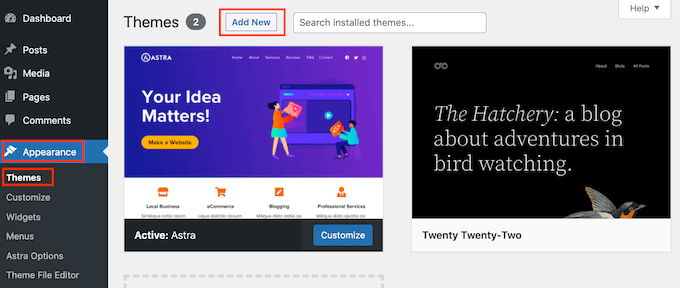
On the next screen, you can choose the theme from: Popular, Latest, or Favorites section or search a theme as you want.

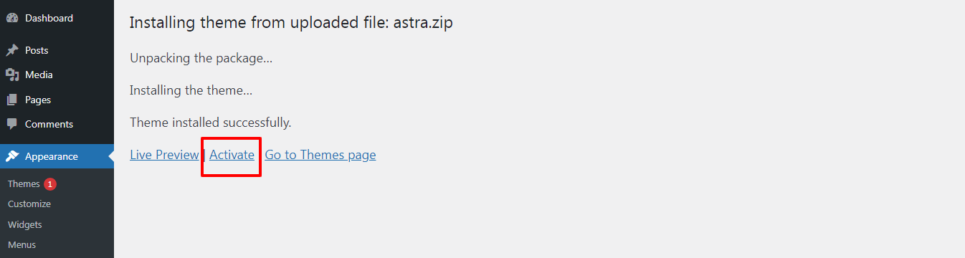
When your theme is ready, WordPress will show a success message. click on the Activate button

Method 2: Uploading a Premium or Custom Theme (ZIP File)
If you’ve purchased a premium theme or downloaded a custom design, you’ll need to upload it as a ZIP file.
Steps:
- Go to Appearance > Themes > Add New.
- Click Upload Theme.

- Select your ZIP file and hit Install Now.
- Once installed, click Activate.
Pro Tip: Always download themes from trusted sources to avoid security risks. You can further safeguard your site by following our guide on securing your WordPress website in 10 steps.
Method 3: Installing a Theme via FTP
For more advanced users, FTP (File Transfer Protocol) offers another method.
Steps:
- Connect to your site via an FTP client.
- Navigate to /wp-content/themes/.
- Upload the unzipped theme folder.
- Go to Appearance > Themes in your WordPress dashboard and activate it.
This is useful if you encounter upload size limits in WordPress.
Tips for Choosing the Right WordPress Theme
When selecting a theme, consider:
- Lightweight & Fast – Helps improve SEO.
- Mobile-Friendly – Most visitors browse from smartphones.
- Regular Updates & Support – Ensures compatibility with new WordPress versions.
- Customization Options – Look for flexibility without needing code.
If your website needs high performance, consider upgrading hosting. Explore options like cheap servers without compromise or even dedicated servers in the USA for better control and SEO benefits.
Common Issues When Adding Themes
Sometimes you may face errors such as:
- Broken Layouts – Due to missing files or plugin conflicts.
- Upload Errors – Often caused by PHP upload limits.
- White Screen of Death – Usually linked to theme incompatibility.
If issues persist, check whether your hosting server is configured correctly. Learn more about why hosting matters in our article on what is a hosting server and why it matters.
FAQs About Adding Themes to WordPress
Q1. Will changing my theme affect my content?
No, your posts and pages remain safe. Only the site’s design changes.
Q2. Can I switch back to my old theme?
Yes, WordPress allows you to reactivate old themes anytime.
Q3. Should I use free or premium themes?
Free themes are fine for beginners, but premium themes offer better support, security, and customization.
Q4. How can I test a theme before activating it?
Use the Live Preview option under Appearance > Themes.
Conclusion
Adding a new theme to your WordPress site is a straightforward process that can dramatically improve your website’s design and performance. Whether you install via the dashboard, upload a ZIP file, or use FTP, the key is to choose a secure, responsive, and fast-loading theme.
For those planning expansion or targeting international markets, check out our guide on launching a website in the UAE. And if you need stronger performance, don’t forget to explore cheap dedicated server hosting.
With the right hosting, theme, and security practices, your WordPress website will be ready to impress visitors and perform better on search engines.
