
On your website, every page is accessible via a URL. When you access any page via a wrong URL, you will get an error message like “page not found” or other similar messages. In a technical language, this type of message is called a 404 Error.
In WordPress, the 404 error page is depending on the theme you choose for site. If you don’t like the design of the default 404 error page offered by your theme (or maybe you want to add a certain element), you can create a custom 404 page. Brizy has a feature to do so.
Follow the below steps to create your 404 Error page:
1.
To create a custom 404 page in WordPress using Brizy,
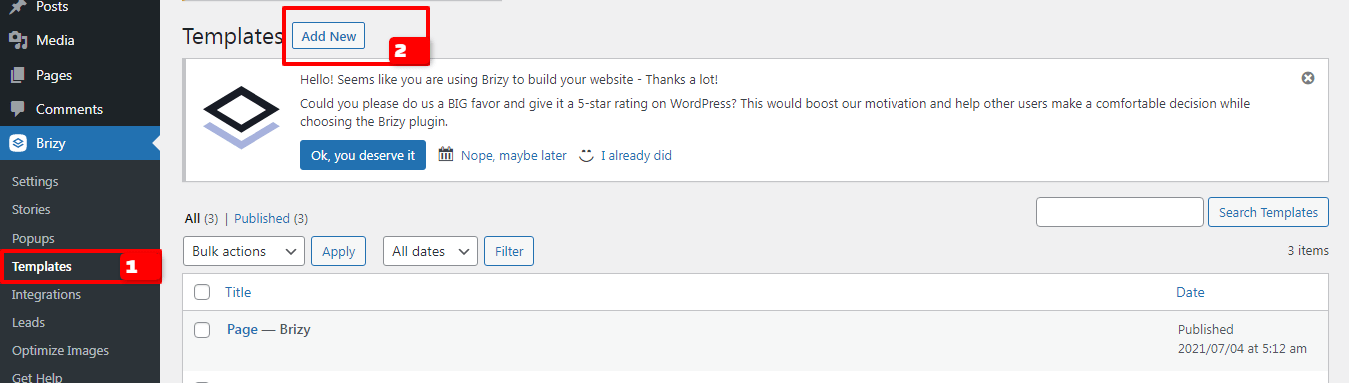
First, go to Brizy » Templates on your WordPress dashboard.
Click the Add New button to create a new template.
2.
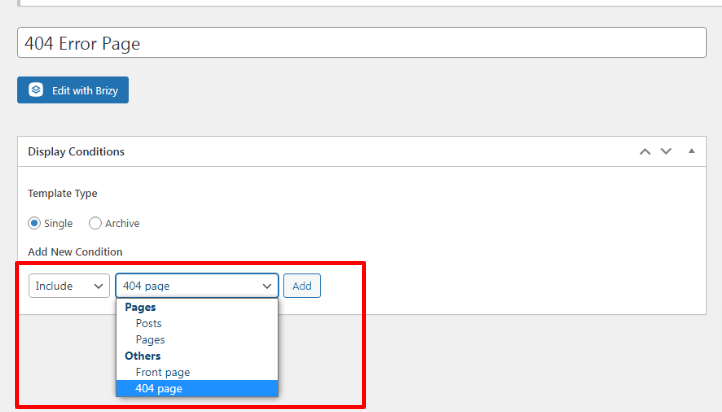
Give a name to your template and set the display condition 404 page. Click the Edit with Brizy button to edit the page with Brizy.
3.
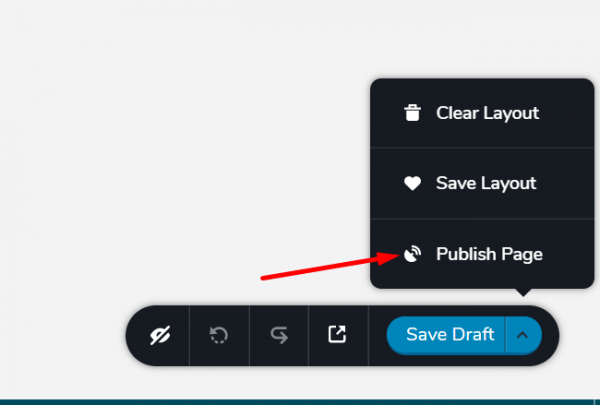
You can edit the page using the Brizy editor and add any element you want.
Once you are done editing the page, click the button (Publish page) and update on the bottom-right corner.
That's it!
FREE CDN
FAST WEBSITES
1 CLICK INSTALLER
POPULAR APPS
CLOUD HOSTING
LOAD BALANCED SERVERS
24/7 SUPPORT
CUSTOMER SERVICE
