
How To Delete Theme In WordPress?
Introduction
In the dynamic realm of WordPress site management, mastering the art of removing themes is an invaluable skill. Whether you're decluttering your dashboard, enhancing security, or making way for a fresh design, understanding the process of deleting themes is crucial. This comprehensive guide will walk you through the step-by-step procedure, offering insights into why it's essential and providing tips for a seamless experience.
How To Delete a WordPress Theme?
Before delving into the deletion process, it's essential to grasp the significance of removing themes. Outdated or unused themes not only clutter your WordPress dashboard but also pose security risks and can hinder your site's performance. Every theme installed on your site represents a potential vulnerability, making regular housekeeping a fundamental aspect of WordPress site maintenance. By deleting unnecessary themes, you not only streamline your site's backend but also reduce the likelihood of security breaches and optimize your site's speed and performance.
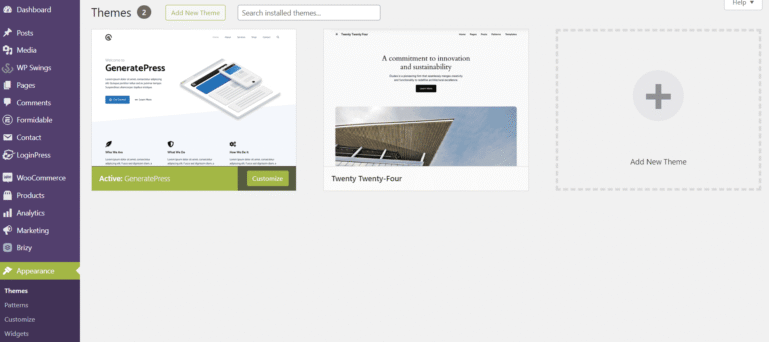
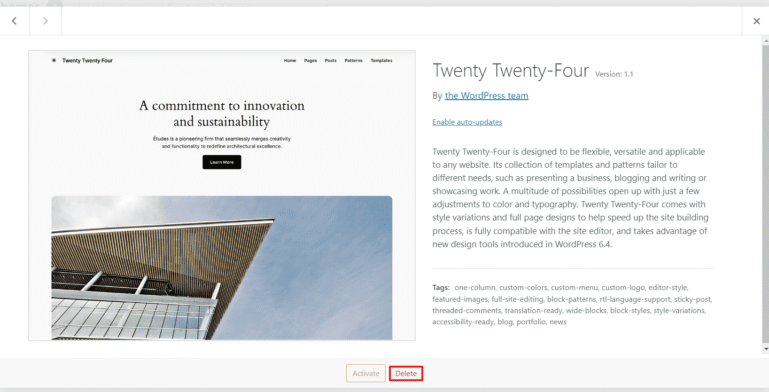
Step-by-Step Guide :
Tips and Considerations
Conclusion
Mastering the process of deleting WordPress themes is an essential skill for every WordPress user. By following the step-by-step guide outlined in this comprehensive article and adhering to the provided tips and considerations, you can effectively streamline your site, enhance security, and optimize performance. Take control of your WordPress dashboard today and enjoy a more efficient and secure site management experience!
